Linting
Zensical Studio's linter catches problems the formatter cannot: skipped heading levels, missing image alt text, and empty link destinations. The formatter handles Markdown style instead, such as list markers, table alignment, and spacing.
Problems appear as underlines in the file and entries in the
Problems panelProblems panelDiagnostics panelProblems tool window. Results update as you edit.
The linter understands your project. It checks content pulled in through
snippets and @use directives, then reports problems in the source file that
produced it.
What the linter checks
The linter checks document structure, accessibility, and Python Markdown extensions. Examples include empty link destinations, duplicate attribute IDs, and untitled content tabs. It does not repeat the formatter's checks.
Nineteen rules ship in total. Eleven run by default. The other eight are opt-in policy checks, such as whether raw HTML is allowed. The linter ignores code, math, HTML comments, and Jinja regions. Inline-text rules also check headings, table cells, container titles, definitions, and footnotes.
Configuration
Create a zensical-studio.toml file in the project root to activate the linter.
Use it to enable opt-in rules, change severities, or disable default rules.
Zensical Studio picks up changes immediately. No restart is needed. This
configuration matches the built-in defaults:
version = 1

[lint.rules]
abbreviation.duplicate-definition = "warning"
attribute.duplicate-name = "warning"
attribute.rewritten-name = "warning"
fence.highlight-range = "warning"
footnote.empty-definition = "warning"
heading.level-skip = "warning"
html.invalid-markdown-mode = "warning"
image.missing-alt = "warning"
link.empty-destination = "warning"
tab.duplicate-title = "warning"
tab.empty-title = "error"

abbreviation.unused-definition = "off"
code.indented = "off"
container.empty-body = "off"
document.first-heading-h1 = "off"
fence.missing-language = "off"
heading.multiple-h1 = "off"
html.disallowed = "off"
section.empty = "off"
Severity levels
Severity controls the editor highlight and the icon in the Problems panelProblems panelDiagnostics panelProblems tool window:
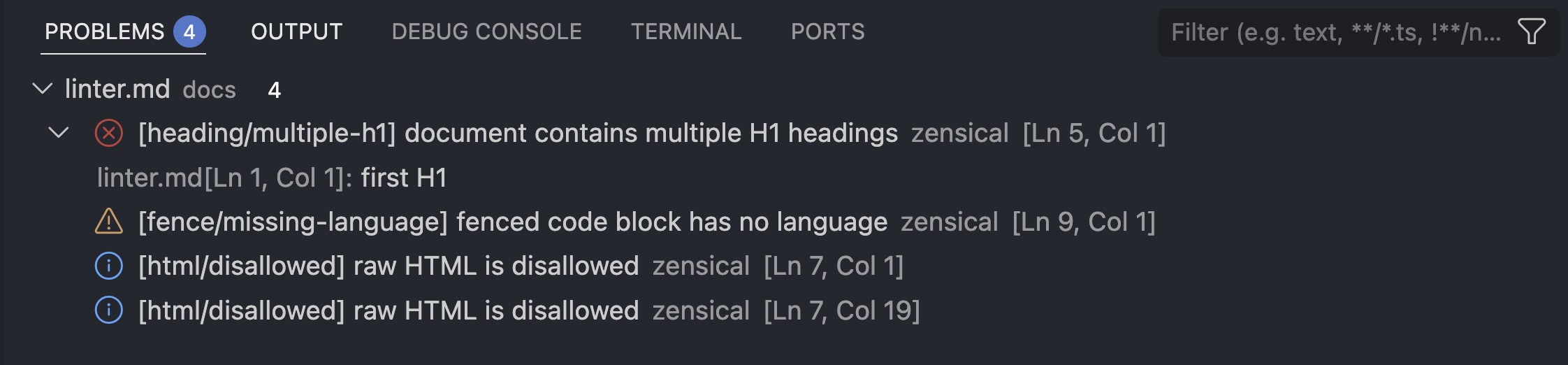
Visual Studio Code shows one of the following icons for different severity levels:
| Severity | Icon | Meaning |
|---|---|---|
error |
The document cannot be processed reliably. | |
warning |
The document likely contains an authoring problem. | |
information |
Informational feedback. | |
hint |
Low-priority guidance. | |
off |
The rule does not run. |
Migration
If you use Markdownlint, the combination of the auto-formatter and the linter
gives you equivalent coverage. Zensical Studio adds checks for Python Markdown
syntax, including content tabs, attribute lists, and abbreviations. It also
resolves snippets, @use directives, and conditional content before checking.
Problems point to their source file, not only the file being read.
There is nothing extra to install or run. Results appear in the same Problems panelProblems panelDiagnostics panelProblems tool window as broken links and orphaned footnotes.
Compatibility with Markdownlint
Some of the linter rules match Markdownlint rules, such as MD001 for
heading/level-skip. The table links to the corresponding documentation.
| Markdownlint | Zensical Studio linter |
|---|---|
MD001 |
Heading levels |
MD025 |
Multiple H1 headings |
MD033 |
Disallowed HTML |
MD040 |
Missing fence language |
MD041 |
First line must be H1 |
MD042 |
Empty link destination |
MD045 |
Missing image alt text |
MD046 |
Indented code |
Suppressing a problem
Some problems are intentional, such as an unfinished link or decorative image. Use one of these comment forms to suppress them locally.
lint: skip
Suppress every rule
<!-- lint: skip --> applies to the next block of content when it appears
on its own line:
<!-- lint: skip -->
[This intentionally has no destination]()
Suppress specific rules
Name one or more rules to suppress them and leave every other rule active:
<!-- lint: skip link.empty-destination image.missing-alt -->
[Intentional]() 
lint: off and lint: on
Suppress every rule
<!-- lint: off --> suppresses a region. <!-- lint: on --> ends it:
<!-- lint: off -->
[This intentionally has no destination]()

<!-- lint: on -->
Suppress specific rules
As with skip, naming rules limit the suppression to those rules:
<!-- lint: off link.empty-destination image.missing-alt -->
[This intentionally has no destination]()

<!-- lint: on link.empty-destination image.missing-alt -->
Unlike skip, which suppresses only the next block, off suppresses every
following block until on appears or the containing block or document ends.
An off region includes nested content. on is optional. An on inside a
nested block re-enables the rule only in that block.
For example, off inside an admonition suppresses both links, then ends when
the admonition ends. Replacing off with skip would suppress only the first
link:
!!! note

    <!-- lint: off -->

    [This intentionally has no destination]()

    [This one is suppressed too]()

[This problem is reported]()
Default rules
heading/level-skip 
Reports a heading that increases by more than one level. A skipped level breaks the document hierarchy that navigation and assistive technology both rely on.
Don't:
# Installation

### Linux
Do:
# Installation

## Linux
link/empty-destination 
Reports an inline link whose destination is empty.
Don't:
Read the [installation guide]().
Do:
Read the [installation guide](installation.md).
image/missing-alt 
Reports an image with empty or whitespace-only alternative text. This covers inline and reference images; a raw HTML image is not checked.
Don't:

Do:

footnote/empty-definition 
Reports a footnote definition with no footnote text. A snippet or
@use directive counts as footnote text, since it can still supply the
content.
Don't:
The deployment needs one exception.[^exception]

[^exception]:
Do:
The deployment needs one exception.[^exception]

[^exception]: The staging environment uses a temporary hostname.
tab/empty-title 
Reports a content tab with an empty title, an error by default rather than a warning, since a tab with no title cannot render reliably.
Don't:
=== ""

    Content without a usable label.
Do:
=== "macOS"

    Installation instructions for macOS.
tab/duplicate-title 
Reports two tabs in the same set with the same visible title. Inline
formatting is resolved before titles are compared, so **macOS** and
macOS still count as duplicates. Separate tab sets, and tabs nested inside
different containers, are checked independently.
Don't:
=== "macOS"

    Intel instructions.

=== "**macOS**"

    Apple silicon instructions.
Do:
=== "macOS on Intel"

    Intel instructions.

=== "macOS on Apple silicon"

    Apple silicon instructions.
attribute/duplicate-name 
Reports an ID or a key-value attribute assigned more than once in one attribute list. Python Markdown silently keeps only the last value, so an earlier one is lost without warning. A repeated class is not affected, since classes accumulate rather than overwrite each other.
Don't:
Release status
{ #draft #published data-state=draft data-state=published }
Do:
Release status
{ #published data-state=published .card .current }
attribute/rewritten-name 
Reports an attribute name that Python Markdown silently rewrites into a
different name. This is the attr_list extension's own behavior: it
replaces every character outside letters, digits, underscores, colons,
periods, and hyphens with an underscore, rather than rejecting the name.
Nothing looks wrong in the source, but anything that targets the name you
typed, such as, CSS, JavaScript, another attribute list, silently stops matching.
Don't:
Release status
{ data@state=published }
Do:
Release status
{ data-state=published }
html/invalid-markdown-mode 
Reports a markdown attribute on an HTML element with an unsupported value,
an element the attribute has no effect on, or a mode the surrounding HTML
context makes ineffective.
Don't:
<div markdown="yes">
**This is expected to be Markdown.**
</div>
Do:
<div markdown="block">

**This is parsed as Markdown.**

</div>
fence/highlight-range 
Reports an hl_lines value that names a line the fenced code block does not
have, whether the value names a single line or a range.
Don't:
``` python hl_lines="3"
print("one")
print("two")
```
Do:
``` python hl_lines="2"
print("one")
print("two")
```
abbreviation/duplicate-definition 
Reports an abbreviation term defined more than once. Terms are compared exactly, including case; Python Markdown otherwise silently uses whichever definition comes last.
Don't:
*[HTML]: Hyper Text Markup Language
*[HTML]: Hypertext Markup Language
Do:
*[HTML]: Hypertext Markup Language
Opt-in rules
These rules encode a project policy or a preferred convention, not a
problem the linter checks for in every project. After you create
zensical-studio.toml to activate the linter, enable the rules you want in
that file.
heading/multiple-h1 
Reports every top-level heading after the first one in a logical document.
An ATX heading (#) and a Setext heading (underlined with =) in a nested
container both count toward the same document-wide total.
Don't:
# Installation

# Configuration
Do:
# Product guide

## Installation

## Configuration
document/first-heading-h1 
Reports a document whose first heading is not a top-level heading. Introductory text or metadata may still come before it, and a document with no headings at all is not reported.
Don't:
Introductory text.

## Installation
Do:
Introductory text.

# Installation
section/empty 
Reports a heading with no substantive content before the next heading at the same or a higher level, or before the end of the document. A subsection underneath it counts as content; a hidden link, footnote, or abbreviation definition does not.
Don't:
## Installation

## Configuration

Configure the project in `zensical.toml`.
Do:
## Installation

Install the package before configuring the project.

## Configuration

Configure the project in `zensical.toml`.
html/disallowed 
Reports raw HTML, inline or block-level, for a project that disallows it. Off by default because raw HTML is valid Python Markdown and some layouts depend on it.
Don't:
Use <strong>extreme caution</strong> in production.
Do:
Use **extreme caution** in production.
fence/missing-language 
Reports a fenced code block with no language. An attribute list that names a
language class, such as .python, still satisfies the rule.
Don't:
```
print("Hello")
```
Do:
``` python
print("Hello")
```
code/indented 
Reports an indented code block and recommends fenced syntax instead. Indentation used structurally, inside a list item or a block quote, is not reported on its own.
Don't:
print("Hello")
Do:
``` python
print("Hello")
```
container/empty-body 
Reports an admonition, a details block, a content tab, a Blocks node, or a definition with no content. A nested container with content of its own counts as content for the container around it.
Don't:
!!! warning
Do:
!!! warning

    Back up the database before continuing.
abbreviation/unused-definition 
Reports an abbreviation definition whose exact term never appears in the page's prose. An occurrence inside code or another opaque region does not count.
Don't:
This page explains style sheets.

*[CSS]: Cascading Style Sheets
Do:
This page explains CSS.

*[CSS]: Cascading Style Sheets
Where to go next
- Auto-format Markdown covers the formatter this page contrasts with.
- Catch and repair problems covers the Problems panel this page's rules also report to.